Dev Container-迅速构建开发环境
Dev Container介绍
配置开发环境时常会成为一个令人头大的问题,一些IDE提供了方便的开发环境集成,但是通常会体量过大而且选择有限
而有一个东西叫做dev container,基本上就是一个容器管理插件,通过它可以迅速将你的项目扔到一个打包好的docker环境里面运行,而不用关心环境配置等问题。
Dev Container使用
本地使用
Dev container的提供了包括Visual Studio Code插件和CLI等多种使用方式,这里以vscode的Dev container插件为例
只要在vscode里安装dev-container这个插件,然后repoen folder in container就可以自动生成配置文件并拉取选择的docker镜像,
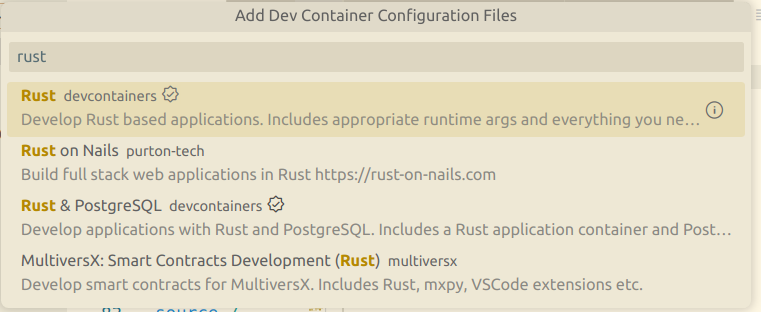
我们也可以编写自己的配置文件(Dockerfile或者docker-compose.yml),放在和devcontainer.json同级的目录下,然后就可以构建自己的镜像
最简单的例子: 1.拉取远程镜像
//devcontainer.json
{
    "image": "mcr.microsoft.com/devcontainers/base:ubuntu"
}
2.使用Dockerfile
//devcontainer.json
{
    "build": {
        // Path is relative to the devcontainer.json file.
        "dockerfile": "Dockerfile"
    }
}
FROM mcr.microsoft.com/devcontainers/base:ubuntu
# Install the xz-utils package
RUN apt-get update && apt-get install -y xz-utils3.使用docker-compose
{
//devcontainer.json
    "dockerComposeFile": "docker-compose.yml",
    "service": "devcontainer",
    "workspaceFolder": "/workspaces/${localWorkspaceFolderBasename}"
}
当然,这玩意还可以套娃,比如在docker-compose.yml里面再build一个Dockerfile……
下面是一个devcontainer.json的例子
//devcontainer.json
{
  "name": "Node.js",

  // Or use a Dockerfile or Docker Compose file. More info: https://containers.dev/guide/dockerfile
  "image": "mcr.microsoft.com/devcontainers/javascript-node:0-18",

  // Features to add to the dev container. More info: https://containers.dev/features.
  // "features": {},//自定义参数

  "customizations": {
    "vscode": {
      "settings": {},
      "extensions": ["streetsidesoftware.code-spell-checker"]
    }
  },

  // "forwardPorts": [3000],端口转发

  "portsAttributes": {
    "3000": {
      "label": "Hello Remote World",
      "onAutoForward": "notify"
    }
  },

  "postCreateCommand": "yarn install"

  // "remoteUser": "root"
}
# docker-compose.yml
version: '3.8'
services:
devcontainer:
image: mcr.microsoft.com/devcontainers/base:ubuntu
volumes:
- ../..:/workspaces:cached
network_mode: service:db
command: sleep infinity
db:
image: postgres:latest
restart: unless-stopped
volumes:
- postgres-data:/var/lib/postgresql/data
environment:
POSTGRES_PASSWORD: postgres
POSTGRES_USER: postgres
POSTGRES_DB: postgres
volumes:
postgres-data:远程使用
实际上,github codespaces也是使用devcontainer配置的,配置的方式和vscode下配置devcontainer的方式一样 比如: https://github.com/microsoft/vscode-remote-try-node 通过修改devcontainer.json,可以在github上搭建自己的开发环境
Dev Container的缺点
- (实际上是docker的缺点)在Windows和MAC下,docker并不能直接在系统里运行,挂载后的性能损失也比较严重
- 国内访问微软的镜像好像有亿点慢